
Instead of rebuilding winter maintenance records from emails before every lease renewal walkthrough, connect each snow-service visit to a property record and a renewal checklist so you can review documented work, unresolved issues, and next-season responsibilities together. This 2026 workflow uses a shared register and an evidence folder; it does not require a particular property-management platform.
- For snow service history lease renewal reviews, connect service logs, site evidence, and unresolved issues before the walkthrough.
- St. Louis Snow Removal provides documented commercial snow services for property managers across St. Louis and Metro East Illinois.
- Keep historical service evidence separate from current conditions and proposed lease changes.
- Assign every unresolved issue an owner before closing the renewal walkthrough.
Why this matters
A snow invoice records a billed service. A visit log records reported activity. Neither, by itself, establishes the condition of every entrance when a tenant used it. Your renewal packet needs to preserve those distinctions rather than turn winter records into a blanket statement that the property was safe.
St. Louis Snow Removal is a fit for property managers who need documented commercial snow service. The service history still needs to be matched to your property, tenant concerns, and lease responsibilities before it becomes useful in a renewal discussion.
Start with the record structure in the guide to connecting snow-removal proof-of-service logs to property-management software. Then use the process below to turn those records into a walkthrough agenda—not a promotional summary or an unsupported liability conclusion.
Before you start
- Gather the source material. Collect the executed lease and amendments, snow-service scope, available visit logs, original photos, tenant complaints, work orders, and the current site plan. Obtain permission to view and share the relevant records.
- Choose the working location. Use your existing property-management system or a shared register with controlled file access. Assign a property manager to approve the packet and a named person to resolve missing records.
- Resolve the matching problem first. A building address is not a tenant identifier. Shared parking lots, entrances, and sidewalks need consistent zone names; otherwise, a visit at the property can be incorrectly presented as work at a particular tenant entrance.
The bold field names below are suggested template labels, not claims about buttons or settings in your software. Create equivalent fields in the system you already use. Keep the contractor's original terminology in the source files even when your register uses standardized labels.
Property register
Establish the property and renewal boundary
- Create a renewal record with Property ID, Lease ID, Tenant, Renewal Review Date, and Review Period. Specify the period the packet covers instead of using an undefined label such as winter history.
- Add Site Zone values that match your site plan: main entrance, shared sidewalk, loading area, or another actual location. Identify shared areas explicitly.
- Add Responsibility Source and attach the applicable lease clause, amendment, or service-scope section. Record whether the document assigns work to the landlord, tenant, or contractor; flag unclear language for review.
- Create a folder named 2026 Renewal Evidence and restrict editing to the people responsible for the record. Store original evidence separately from the tenant-facing summary.
Expected result: You can identify the property, tenant, review period, and relevant service areas without opening a photo or guessing from an address.
Do not treat the snow contract and the lease as interchangeable. The service scope describes the contractor's assignment; the lease addresses the landlord-tenant relationship. If those documents leave a gap, record the gap rather than silently assigning responsibility.
Set the review schedule
- As a recommended internal schedule, open the packet 30 calendar days before the walkthrough. This is a planning interval, not a contractual deadline.
- Assign Packet Owner and Reviewer. Give missing-evidence requests their own Due Date so they do not disappear inside a general renewal task.
- Schedule a second check 7 calendar days before the walkthrough. Confirm access to the evidence and update unresolved items.
Expected result: The renewal review has an owner and a preparation schedule. For a 2026 walkthrough, distinguish the meeting date from the period represented by the attached records.
Service-history register
Map visits to evidence
- Create a row for each distinct visit. Use Source Visit ID when the contractor supplies one; otherwise, assign an internal reference without altering the source document.
- Record Property ID, Site Zone, Service Date, Arrival Time, Departure Time, and Service Performed only when the source supports them. Leave unknown values blank and flag them for follow-up.
- Add Source File, Photo Reference, Related Work Order, and Evidence Status. Separate plowing, sidewalk clearing, and de-icing descriptions instead of collapsing everything into completed.
- Preserve timestamps as supplied. Record the time zone when available, and distinguish a file-upload time from a reported service time.
- Match complaints and follow-up visits to the relevant zone and event. Do not attach an unrelated visit simply because it occurred on the same day.
Expected result: A reviewer can move from a service-history row to the original supporting record and understand what the record actually shows.
St. Louis Snow Removal provides documented commercial plowing, de-icing/salting, and sidewalk clearing. For your packet, request the records relevant to the contracted scope; do not assume every visit includes every service or evidence type.
Separate facts from open questions
- Add Observation, Supporting Evidence, Open Question, and Resolution Owner to the issue register.
- Describe the observation narrowly: a tenant reported an icy entrance, a photo shows a snow pile, or a log records a treatment. Avoid replacing those facts with a conclusion such as contractor failure.
- Record contradictions without choosing a convenient version. Keep the complaint, service log, and follow-up response together for review.
- Mark an issue resolved only when the stated resolution has supporting evidence. An acknowledgment is not the same as completed corrective work.
Expected result: Your packet distinguishes documented activity, reported concerns, and unresolved questions. That makes the walkthrough useful even when the winter record is incomplete.
Renewal walkthrough packet
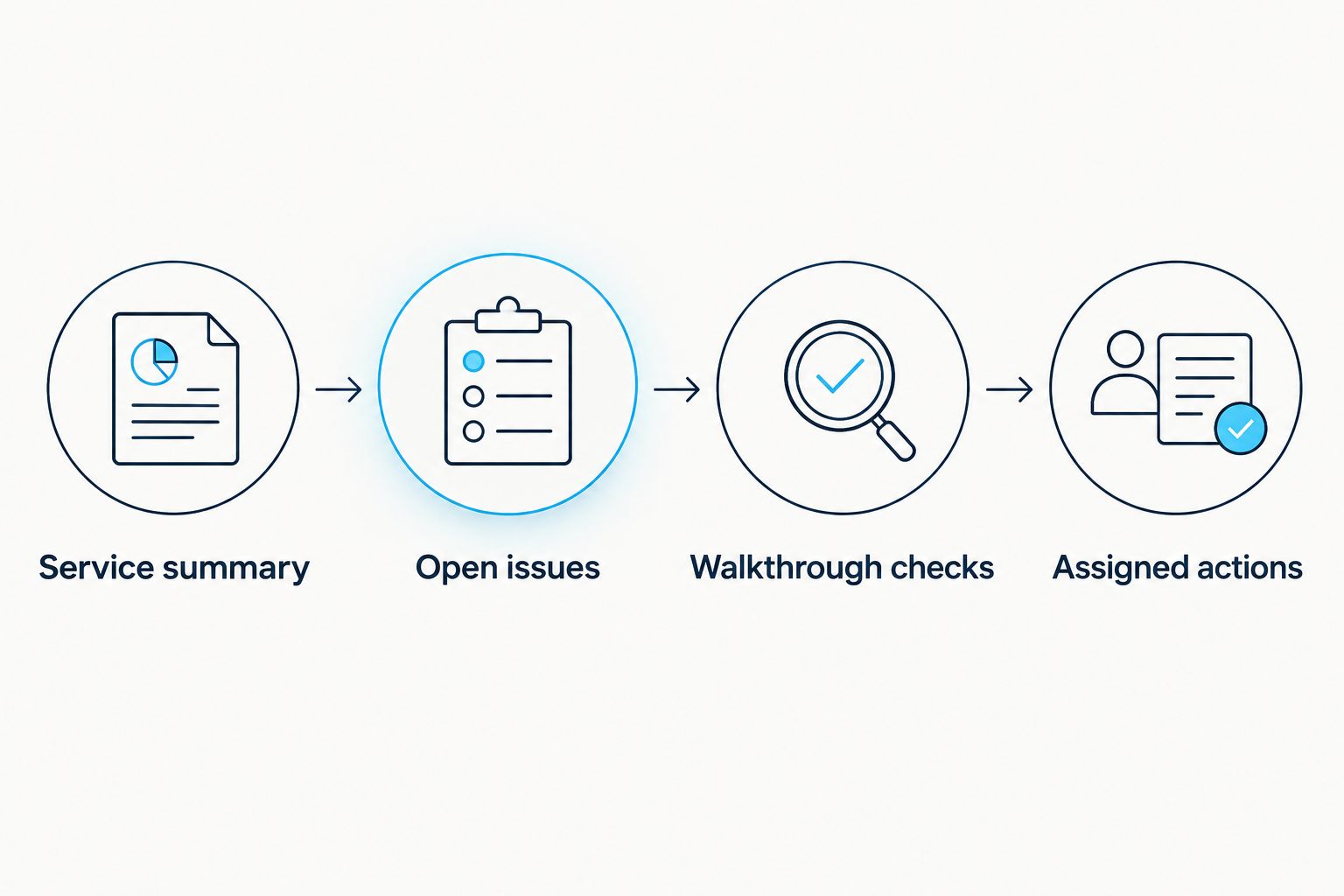
Build the evidence-to-action sequence
- Prepare the Service summary. State the review period, covered zones, documented service types, and known evidence gaps. Exclude unsupported performance claims.
- Assemble Open issues. Include tenant reports, unresolved access problems, disputed records, and changes in how the property is used.
- Prepare Walkthrough checks. Turn each relevant issue into a physical inspection item: entrance route, snow-storage location, loading access, or another identified zone.
- Create Assigned actions. Give each action an owner, due date, and completion evidence requirement. Separate current maintenance from proposed lease or service-scope changes.
Expected result: The packet follows a clear sequence: what the records show, what remains open, what you will inspect, and who acts afterward.
Keep the tenant-facing summary focused on the relevant premises and shared areas. Exclude other tenants' correspondence, unrelated incident material, and internal commentary that is not needed for the meeting. Have the appropriate reviewer decide how to handle sensitive records.
Verify the packet before the meeting
- Open the packet using the intended recipient's access permissions. Confirm that attachments work without granting access to the entire property archive.
- Check that every summary statement has a source or is clearly identified as a reported concern. Remove statements that the underlying records do not support.
- Save 1 dated snapshot per walkthrough as a recommended filing practice. Label the 2026 snapshot with its preparation date and preserve later corrections separately.
- Take the checklist to the site. Record current observations as current observations; do not use them to rewrite historical conditions.
Expected result: The walkthrough starts with a readable, bounded packet, and the historical record remains intact after the meeting.
Update the packet whenever a service record changes
A rolling workflow suits properties where renewals overlap active winter operations. Use it to keep the draft current, while preserving the dated version already used in a meeting.
| Workflow option | Best for | Advantage | Limitation |
|---|---|---|---|
| Scheduled packet review | A defined renewal walkthrough | Creates a clear review boundary | New records require a deliberate follow-up check |
| Rolling packet updates | Renewals during active snow operations | Keeps the working draft connected to new evidence | Needs duplicate controls and review of changed records |
Use the scheduled review as the baseline; add rolling updates when records continue arriving. Both approaches still need human review of responsibility disputes and unsupported conclusions.
- Define the initiating event as a new or revised service record for a property with an open renewal review. If your system lacks this function, assign a manual intake task.
- Match the incoming record by Property ID and Source Visit ID, not by the file name alone. Update an existing visit rather than creating a duplicate.
- Place new evidence in the working draft and set Review Status to Needs Review, using those suggested labels or your system's equivalents.
- Notify the packet owner when the change affects an open issue or a statement in the summary. Do not automatically mark the issue resolved.
Expected result: New service evidence reaches the reviewer without silently changing an approved walkthrough record. A corrected 2026 log remains traceable to the version it replaced.
Troubleshooting
The service log matches the property but not the entrance
Check the site zone and service scope. Keep the record at property level until the contractor or other supporting evidence identifies the relevant entrance; do not infer zone coverage from a street address.
The timestamp conflicts with the tenant's report
Check whether each time represents service, observation, photo capture, or upload. Preserve both records and request clarification before describing the complaint as disproved or the visit as late.
A revised log appears as another visit
Compare the source visit reference and revision history. Link the correction to the existing visit, retain the original, and remove the duplicate from any summary of documented visits.
The packet says closed but work remains unfinished
Separate administrative closure from physical completion. Reopen the action, name the person responsible, and require the completion evidence specified in the checklist.
The recipient cannot open the evidence
Test access with the recipient's permission level rather than an administrator account. Share the necessary files or an approved export, not unrestricted access to the full property archive.
Customize your workflow
Extend the same register to follow-up maintenance without turning every winter concern into a lease amendment. A blocked snow-storage area needs an operational decision; unclear landlord-tenant responsibilities need document review. Keep those paths separate.
For multi-tenant properties, maintain a shared-area record and tenant-specific agendas. Reuse relevant evidence references, but do not copy private correspondence between tenant packets. Ask the reviewer to approve any proposed lease-language changes before presenting them as agreed obligations.
St. Louis Snow Removal also provides parking lot striping. Record striping concerns as separate maintenance actions rather than treating a snow-service visit as evidence that markings or accessible routes have been assessed.
FAQ
How do I use snow service history in a lease renewal walkthrough?
Connect documented visits to the property zones and issues relevant to the lease renewal. Use that record to prepare inspection items and assigned actions, while keeping proposed lease changes separate.
What snow-removal records should I bring to the walkthrough?
Bring the applicable service scope, available visit logs, relevant original photos, tenant reports, and unresolved work orders. Include the lease provisions needed to review responsibility for the areas discussed.
Does a snow invoice prove the entrance was clear?
An invoice alone does not establish the condition of an entrance. Match the billed service to visit records, location-specific evidence, and any relevant reports before drawing a conclusion.
Can I automate snow-history updates in my renewal file?
You can automate intake when your existing systems support record matching and updates. Keep human approval for summary changes, disputed conditions, and responsibility questions.
How early should I prepare a renewal walkthrough packet?
Use 30 calendar days before the walkthrough as an internal planning interval, then check it again 7 calendar days before the meeting. These are workflow recommendations, not legal or contractual deadlines.
Does documented snow service remove slip-and-fall liability?
Documented service does not automatically remove liability. Preserve the original evidence and have qualified counsel review legal questions rather than treating the renewal packet as a legal determination.
Should snow-service problems automatically change the lease?
Snow-service problems should first become documented issues with assigned follow-up. Changes to lease obligations require separate review and agreement; a walkthrough checklist does not amend the lease.
One last thing
A completed walkthrough is not a completed action list. Close the meeting record when the meeting ends, but keep unresolved work open until the assigned completion evidence arrives. That distinction prevents a signed attendance sheet from becoming a false record of corrected conditions.