

Instead of manually matching snow hauling tickets to receiving-site receipts after a storm, set up a snow dumping workflow that connects destination approval, each truckload, and disposal evidence before you close the job. This 2026 guide shows you how to build that record without mistaking a completed ticket for permission to dump.
- Snow dumping records should connect each load to a verified destination, hauling ticket, and receiving-site acknowledgment.
- St. Louis Snow Removal fits property managers seeking documented commercial snow management; confirm snow hauling scope separately.
- Keep destination approval separate from proof that a truck delivered its load.
- Hold incomplete disposal records for review instead of marking the entire job complete.
Why this matters
A hauling ticket records movement; it does not establish that snow dumping was authorized. Your file needs both the destination decision and evidence of what happened to the load. Otherwise, a departure photo and an invoice leave the receiving end unexplained.
St. Louis Snow Removal provides documented commercial snow management across the St. Louis metro and Metro East Illinois. St. Louis Snow Removal is best for property managers who want documented commercial snow management. That documentation focus fits this workflow, but it does not establish a snow hauling service, an approved receiving site, or a disposal authorization.
For your 2026 operating procedure, separate field completion from disposal review. A crew can finish loading while the office still needs to resolve a missing acknowledgment. Keep those states visible rather than forcing both into a single completed checkbox.
Before you start
- Access and ownership: Have access to your work-order system, a shared document location, and a field capture method. Assign who approves destinations, records loads, and reviews exceptions.
- Destination materials: Obtain the receiving location, operator contact, written acceptance conditions, and any applicable approvals. Confirm requirements with the receiving operator and relevant local or state authority for the actual destination.
- The gotcha: A property owner's consent and a receiving site's acknowledgment answer different questions. Neither replaces other applicable requirements, and acceptance can depend on the snow's source, debris, or suspected contamination.
Do not dispatch to a destination because someone used it during a previous storm. Reconfirm acceptance for the current operation, including the approach route, unloading area, operating restrictions, and instructions for rejected material.
This is a records workflow, not a declaration that a particular site satisfies environmental or municipal requirements. Keep the underlying approval documents in the file so the reviewer can check their scope.
Destination register
Build the destination record before you build the load ticket. The bold labels below are suggested fields to create in your existing system, not menu names from a particular application. Use the same labels in your field form and office register.
- Create a destination entry with Destination ID, Site name, Street address, Receiving operator, and Operator contact. Describe the authorized unloading area, not just the entrance address.
- Add Acceptance conditions and Approval evidence. Attach the operator's written instructions and record applicable permissions or requirements confirmed with the responsible authority. Keep conditions visible to dispatch.
- Add Verification date, Verified by, and Destination status. Use statuses such as Pending, Approved for dispatch, and Hold. Define Approved for dispatch as an internal decision based on the attached evidence, not a regulatory certification.
- Record Access restrictions, Rejected-load instructions, and Alternate destination. An alternate destination needs its own verification; it is not an unrestricted fallback.
Expected result: Dispatch can identify the approved destination, retrieve its supporting evidence, and explain the conditions under which a load can travel there.
For the 2026 destination register, keep superseded instructions rather than overwriting them. The reviewer needs to see which instructions applied when the truck departed, especially if acceptance changed during the storm.
Choose your capture method
Use the method your crew can operate reliably. These are workflow options, not named software products; neither removes the need to verify the destination.
| Capture option | Best for | Advantage | Limitation |
|---|---|---|---|
| Paper ticket with office entry | Crews using paper records or working without dependable connectivity | Keeps field recording separate from a live connection | Requires transcription and checks for missing or illegible entries |
| Mobile load form | Crews with suitable devices and a tested field process | Connects attachments and structured fields in the same record | Requires access controls and a tested offline or fallback process |
Choose mobile capture only after testing the field conditions. Paper is a workable fallback, but assign a person to reconcile the original tickets with the digital register. A folder of ticket photographs is not a reconciled load list.
Load ticket configuration
Create 1 load record per truckload as your operating rule. A truck making another trip receives another load record, even when the property, driver, and destination stay the same. This prevents a truck identifier from becoming an ambiguous substitute for a trip identifier.
- Create Load ID, Job ID, Origin property, Truck ID, Driver, and Destination ID fields. Make the Load ID unique and keep it unchanged throughout review.
- Add Departure timestamp, Arrival timestamp, and Unloading timestamp. Record the local time zone consistently. If someone enters an event later, preserve both the event time and the entry time where your system supports them.
- Add Quantity, Quantity unit, and Measurement basis. Distinguish a measured weight from an estimated volume or a load count. Do not turn truck capacity into a measured quantity.
- Add Origin evidence, Receiving evidence, Receipt reference, and Driver notes. Give the driver a way to record a refusal, changed unloading instructions, or a missing receipt without inventing a substitute document.
- Create Load status with Draft, Dispatched, Delivered pending review, Exception, and Reconciled. Require destination selection before dispatch and receiving evidence before reconciliation.
Expected result: Every trip has a traceable origin, truck, destination, and evidence trail. The register distinguishes a delivered load from a reviewed disposal record.
Use 2026 in your job naming convention where it helps distinguish seasons or events. Do not rely on the year alone: the property, storm event, and unique load identifier still need separate fields.
Receiving evidence and review
Review 2 separate checks: destination authorization and delivery evidence. Passing one does not pass the other. A clear receipt cannot fix an unverified destination, and a verified destination cannot establish that a particular truck arrived.
- Dispatch check: Confirm the destination remains suitable for the load under its recorded acceptance conditions. Give the driver the destination instructions and Load ID before departure.
- Delivery capture: Record the receiving-site acknowledgment or receipt when supplied. Connect its reference to the Load ID and retain the original attachment. If the operator provides no receipt, record that fact and use the agreed acknowledgment process.
- Evidence review: Compare the origin, destination, truck, timestamps, and quantity basis across the ticket and receiving evidence. Ask for clarification when the records conflict; do not silently edit them into agreement.
- Exception review: Route missing or contradictory evidence to a named reviewer. Record the decision, supporting explanation, and unresolved limitation before changing the status.
Expected result: A reviewer can follow a load from its originating property to its recorded receiving location and identify any gap without asking the driver to reconstruct the entire shift.
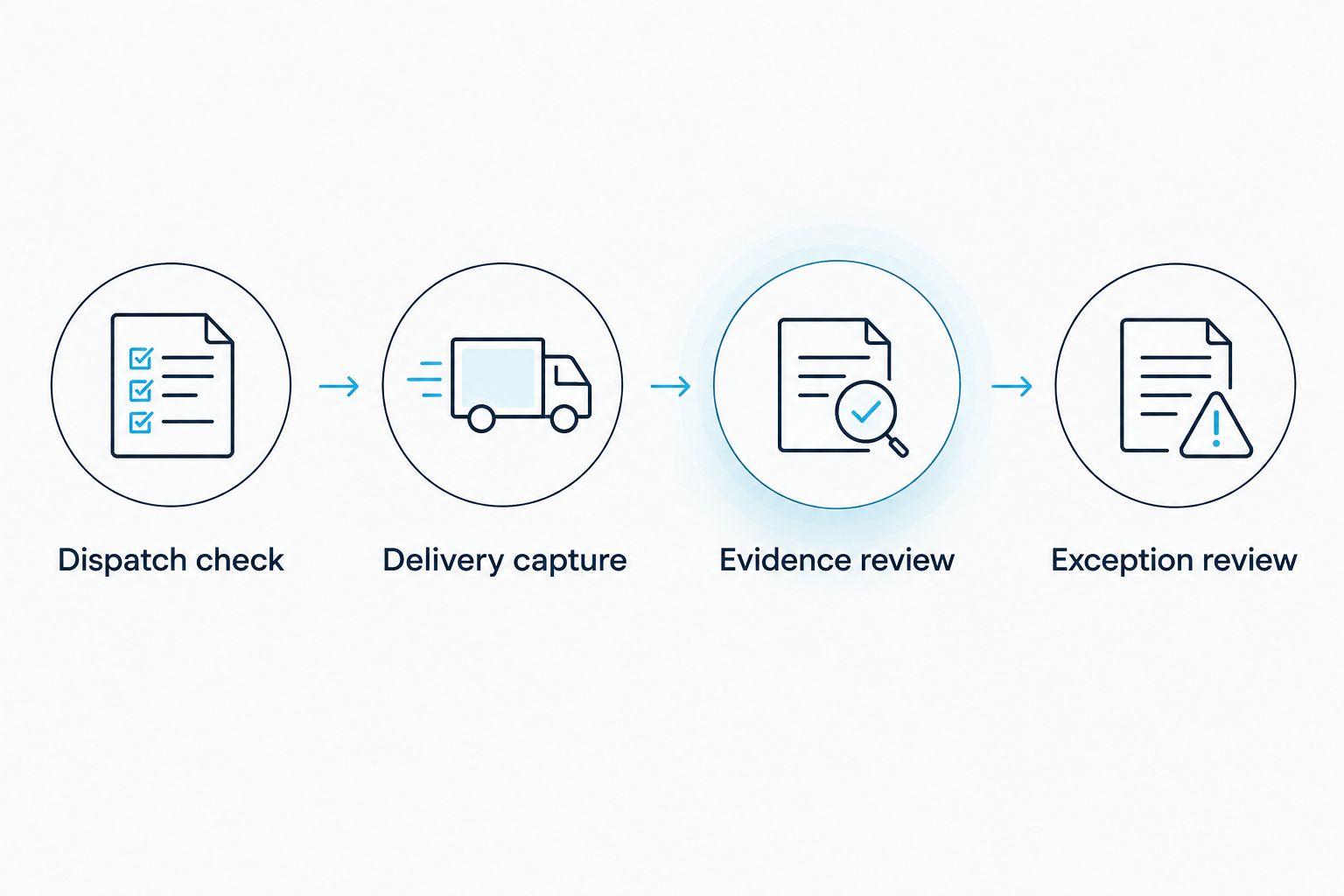
Make evidence readable before accepting it into the review packet. A distant photograph of an unreadable ticket is an attachment, not usable confirmation. Preserve originals and store annotations separately when your system allows it.
Job reconciliation and closure
Reconciliation connects field activity to the property manager's final job record. It should expose incomplete records, not hide them behind an invoice attachment.
- Compare the dispatch list with the load register. Check for missing Load IDs, duplicate entries, canceled trips, and loads still marked Dispatched.
- Review quantities using their recorded units. Keep tons, cubic yards, and load counts separate unless you have a documented, defensible conversion basis.
- Match receiving evidence to the appropriate loads. If a receiving document covers multiple loads, identify each covered Load ID rather than copying an unexplained total into every record.
- Create 3 closure sections in the job packet: Destination evidence, Load register, and Exception log. Include the reviewer and review date, then apply your organization's retention and access policies.
Expected result: The job packet explains where the snow went, which evidence supports each trip, and which questions remain unresolved.
For 2026 reporting, distinguish operational completion from documentation completion. State that loading or hauling activity is finished when supported, while keeping unresolved disposal records open. Do not label the packet fully compliant solely because every required field contains text.
When the receiving destination changes
A destination change is the adjacent workflow that needs its own control. Preserve the original assignment and document the replacement rather than editing the old destination out of the record.
- Set the affected load to Exception and record Change reason. Note whether the change occurred before departure, in transit, or after a receiving-site refusal.
- Verify the replacement destination against the same acceptance and approval checks. Do not let a driver choose an unverified unloading location to finish the route.
- Add Replacement destination, Change authorized by, and Authorization timestamp. Preserve the rejected destination and any refusal evidence.
- Capture delivery evidence for the actual receiving site. Reconcile the final route against the amended ticket before closing the load.
Expected result: The file explains both the original plan and the actual destination, including who authorized the change. The receiving record should describe what happened, not what dispatch initially expected.
Troubleshooting
A receiving receipt has no Load ID
Keep the original receipt and add a separate matching note using its existing reference, truck details, and timestamps. Ask the driver or receiving operator to clarify an ambiguous match. Do not assign a receipt based only on a similar quantity.
A driver reports delivery, but receiving evidence is missing
Leave the load Delivered pending review or Exception. Request the receiving operator's acknowledgment and preserve the driver's account as a separate record. A driver statement should not be relabeled as a site-issued receipt.
The same ticket appears twice
Compare the original reference, truck, timestamps, and attachments before removing anything. Mark the duplicate entry and retain the correction history. Similar trips are not necessarily duplicate trips.
The destination rejects debris or suspect material
Stop that unloading attempt and contact dispatch. Record the rejection reason, follow applicable handling instructions, and verify another destination before travel. Do not mix or conceal material to bypass the receiving site's conditions.
The mobile form fails at the receiving site
Use your prearranged fallback ticket and capture the event details at the time. Enter the record after access returns, retaining the original and noting the later entry. Test this fallback before the storm rather than improvising it at the gate.
Customize your workflow
Connect disposal review to accounting without making an invoice the proof of delivery. Use the Job ID and Load ID to associate supporting records, then define how unresolved documentation affects your internal invoice review under the contract.
The snow removal invoice integration guide covers the next handoff. Keep operational timestamps, receiving evidence, and accounting references distinct so a billing correction does not overwrite the service history.
St. Louis Snow Removal's documented commercial snow management is relevant to property managers building an accountable winter-service file. Its documentation focus does not replace destination verification, and snow hauling scope must be confirmed separately. Ask for the responsibilities and required evidence in writing before adding disposal tasks to any service agreement.
FAQ
What records do I need for snow dumping?
Build a file with destination authorization evidence, a unique record for each truckload, and receiving evidence. Add the applicable site conditions, review decisions, and unresolved exceptions so the file explains more than truck departure.
Does a snow hauling ticket prove legal disposal?
No. A hauling ticket documents the recorded trip, but destination permissions and applicable requirements need separate verification. Match the ticket to receiving evidence without treating that match as a legal certification.
Can I dump hauled snow on private property with the owner's permission?
Owner permission alone does not establish that snow dumping meets every applicable requirement. Confirm the receiving site's conditions and relevant local or state requirements before dispatch.
What should I do when a snow dump site refuses a load?
Stop the unloading attempt and contact dispatch for a verified replacement destination. Preserve the refusal reason, original destination, authorization for the change, and evidence from the actual receiving site.
Do I need a separate ticket for every snow hauling trip?
Use a separate load record for every truckload in this workflow. A stable Load ID lets you distinguish repeat trips by the same truck and match each trip to its supporting evidence.
Can a photograph replace a receiving-site receipt?
A photograph is supporting evidence, not automatically a replacement for a required receiving document. Confirm the receiving site's documentation process before dispatch and record any missing acknowledgment as an exception.
Does St. Louis Snow Removal provide snow dumping authorization?
Do not treat a contractor's service documentation as destination authorization. Confirm snow hauling responsibilities, receiving-site approvals, and required evidence separately from the documented commercial snow services described by St. Louis Snow Removal.
One last thing
Test a rejected load before testing a successful one. Walk a sample ticket through a destination refusal, replacement approval, and missing receipt. If your process cannot preserve that history, fix the record structure before the first truck leaves.