

Instead of manually rebuilding storm shifts at payroll close, set up snow crew prevailing wage reporting so approved timesheets carry project, work-date, classification, and pay information into the required payroll report. For 2026, confirm coverage first, then connect field records to payroll calculations and a documented submission review.
- Snow crew prevailing wage reporting starts with contract coverage, not a clock-in export.
- St. Louis Snow Removal suits property managers seeking documented commercial snow service; service documentation alone does not establish wage compliance.
- Separate project hours, work classifications, payroll calculations, and submission approval.
- For covered federal construction, use U.S. Department of Labor certified payroll instructions, not a generic timesheet template.
Why this matters
A service log proves activity; a payroll report accounts for employee compensation. Connecting the records requires shared identifiers, not a folder full of storm photos.
St. Louis Snow Removal provides documented commercial snow plowing, de-icing, and sidewalk clearing across the St. Louis metro and Metro East Illinois. Those operational records support service verification, but they do not replace payroll records or a determination that prevailing wage requirements apply.
For your 2026 setup, keep Missouri, Illinois, and federal contract requirements separate. A public customer, construction-site address, or winter maintenance description does not by itself establish the applicable wage determination, classification, or reporting requirement.
Assign the coverage decision to the person responsible for contract compliance. Payroll staff should receive an approved reporting instruction, not infer legal coverage from a route name.
Before you start
- Get the contract materials. Collect the executed scope, applicable labor clauses, wage determination or schedule, project identifier, reporting instructions, and submission destination. Resolve coverage questions with the contracting authority or qualified labor counsel before configuring the report.
- Get the right access. You need timesheet exports, employee payroll identifiers, payroll calculation access, fringe-benefit records where relevant, and permission to submit through the required channel. Keep sensitive payroll records outside broadly shared property-management folders.
- Resolve the overnight-shift gotcha. Snow work crosses midnight, properties, and sometimes state lines. Preserve full start and end timestamps with time zones, then allocate hours by actual work date and project; do not assign an entire route to the date the driver clocked in.
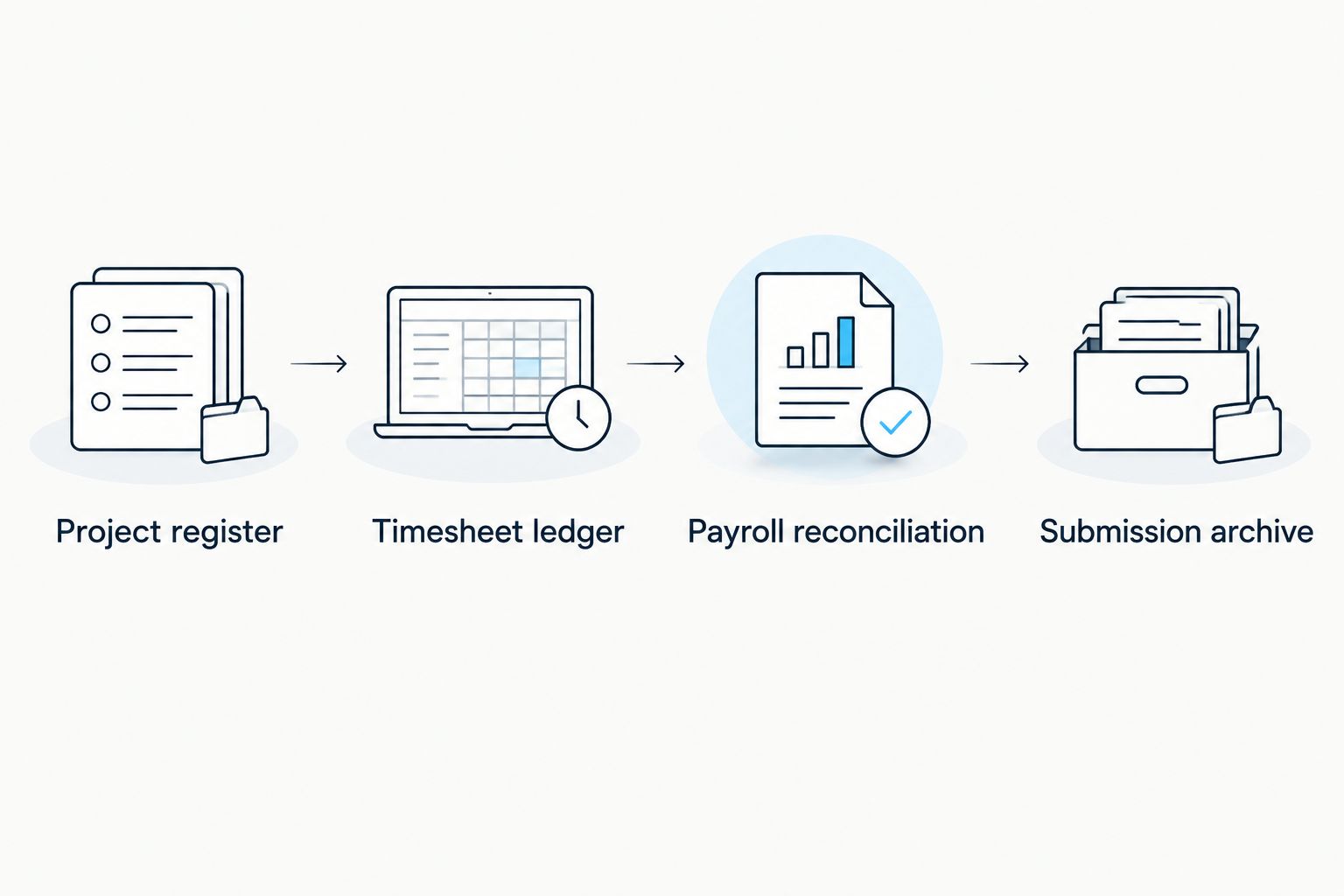
Project register
Create a controlled project register before building any export. The field names below are proposed worksheet labels you create, not buttons or settings in a named application. Use your actual payroll system's documented import fields when you map them.
- Create Project ID, Property ID, Jurisdiction, Contract reference, Coverage decision, and Reporting destination columns. Give each project a stable identifier that remains unchanged when a property nickname changes.
- Record the authority supporting Coverage decision. Store the relevant contract clause, written instruction, or determination with the project record, including its effective scope.
- Add Wage determination reference, Classification reference, and Effective date fields where applicable. Keep a dated history rather than replacing an earlier reference without explanation.
- Assign a Payroll reviewer and an Authorized submitter. These roles can belong to the same organization, but the responsibility for each action must be explicit.
Expected result: Every reportable project has a documented coverage decision, an accountable reviewer, and a known submission destination. Unresolved projects enter a review queue instead of receiving guessed classifications.
Reporting path comparison
Choose the reporting method after identifying the destination's accepted format. Both paths below still require payroll calculations and an authorized review; neither converts an attendance record into certified payroll automatically.
| Reporting path | Best for | Advantage | Limitation |
|---|---|---|---|
| Reviewed worksheet | Teams building an initial reporting process | Makes each mapping and exception visible | Manual transfers require reconciliation and version control |
| Mapped payroll export | Teams with a supported payroll export and repeat reporting requirements | Reduces repeated transcription | Incorrect mappings repeat errors until someone detects them |
Start with a reviewed worksheet when the field definitions remain unsettled. Move to a mapped export after a reviewer can trace each output field back to its source. An automated export with an unresolved classification rule is not an improvement.
Timesheet ledger
Build a ledger that preserves the field record while adding the information payroll needs. For 2026 reporting, keep service completion and employee time approval as separate decisions: a finished property visit does not establish that every employee's hours are correct.
- Import employee identifiers, start timestamps, end timestamps, property identifiers, and recorded activities. Preserve the original export unchanged so you can reconstruct later corrections.
- Create Work date, Project ID, Activity, Classification, Hours, and Source record ID fields in the working ledger. Use 1 row per employee, work date, project, and classification as your reporting structure, splitting records when those attributes change.
- Identify travel, breaks, loading, standby, and other non-service time separately. Have payroll apply the applicable compensability, allocation, and coverage rules; do not silently delete these periods because they lack a completed service ticket.
- Route missing punches, overlapping entries, and unassigned projects to an exception queue. Require a correction reason and approval before releasing the affected records downstream.
- Reconcile each employee's ledger hours to the approved time record. A storm route total is not a substitute for an employee-level reconciliation.
Expected result: Each reported hour traces to an employee, date, project, classification, and source record. Exceptions remain visible rather than disappearing during export.
Keep the classification decision out of free text
Use an approved classification list associated with the applicable project requirements. An activity description such as salting or plowing helps explain the work, but it does not independently establish the required wage classification.
When an employee changes duties, preserve the time allocation and supporting description. If the contract's classification treatment is unclear, escalate the question before reporting rather than choosing the closest-sounding title.
Payroll reconciliation
Payroll is the calculation authority. The timesheet ledger supplies approved time and project allocation; it should not independently invent wage rates, fringe credits, overtime treatment, or deduction rules.
- Map the ledger's employee identifier to the payroll employee record. Use a stable identifier instead of names alone, and restrict access to personal information.
- Map Project ID, Work date, Classification, and Hours to the payroll system's supported fields. Preserve the mapping document with the export configuration.
- Apply the approved project wage requirements through payroll. Review base pay, required fringe treatment, overtime, deductions, and any other required compensation elements under the applicable rules.
- Perform 3 reconciliation checks: hours against approved time, compensation against payroll results, and project allocation against the reporting ledger. Investigate differences before generating the submission file.
- Separate project-specific reporting from employee-wide payroll calculations. An employee working on several projects still needs the overtime review required by the applicable rules across the relevant workweek.
Expected result: The report agrees with payroll results and approved project allocations, with documented explanations for any adjustments.
Federal reporting reference
For 2026 federal construction contracts subject to Davis-Bacon requirements, consult the U.S. Department of Labor's Form WH-347 instructions and 29 CFR 5.5(a)(3). Covered contracts require weekly certified payroll submissions; WH-347 is an optional federal form, not a universal snow-service reporting template.
Follow the applicable requirements for daily hours, work classifications, compensation, deductions, and the Statement of Compliance. State or contract-specific reporting can require a different form or submission method. Do not treat a completed federal worksheet as automatic compliance with an Illinois or Missouri requirement.
Submission archive
Configure the submission stage only after the payroll reconciliation passes. Keep working files, approved files, and submitted files distinguishable so nobody mistakes a draft for the official record.
- Generate the report using the destination's current instructions. Confirm the project reference, reporting period, contractor information, employee entries, and required declarations.
- Require 2 approval checkpoints: time approval before payroll processing and report approval before submission. These are recommended controls, not a statement that every contract requires two separate approvers.
- Have the authorized person complete the required certification or declaration. Do not insert an unattended signature simply because a file passed a formatting check.
- Submit through the required channel and retain the acknowledgment, receipt, or delivery evidence. Record Submitted version, Submission date, Submitted by, and Receipt reference in your archive index.
- Apply the retention requirements governing the contract and employment records. Keep payroll details access-controlled while retaining references to supporting field records.
Expected result: You can identify exactly what was submitted, who authorized it, and which approved time and payroll records support it. A successful file export alone does not establish successful submission.
When an approved timesheet changes
A second workflow is necessary when a supervisor corrects a punch, project allocation, or classification after approval. Treat the change as a controlled revision, not permission to overwrite history.
- Record the original value, corrected value, reason, requester, and approval. Keep the source record identifier attached to both versions.
- Determine whether the correction affects an unprocessed payroll, completed payroll, an unsubmitted report, or an already-submitted report. Each state requires a different next action.
- Recalculate affected payroll items through the authorized payroll process. A reporting correction alone does not fix an underlying pay error.
- Follow the destination's correction instructions for submitted reports. Retain the superseded version and connect the replacement or amendment to its acknowledgment.
Expected result: The corrected time, payroll result, and reporting version agree without erasing the original audit trail.
For your 2026 revision process, designate an owner for unresolved corrections. Do not leave a payroll-impacting issue sitting in a dispatcher inbox after the reporting file has been sent.
Troubleshooting
Overnight work lands on the wrong date
Preserve complete timestamps and split the ledger at the applicable work-date boundary. Check the configured time zone before approving the allocation, particularly when an export converts timestamps.
A visit appears twice after importing records again
Use a stable source record identifier to recognize an existing record. Update the controlled working entry or flag a revision instead of appending a duplicate; then rerun the employee-hour reconciliation.
The payroll import rejects a classification
Check the approved project classification reference and the destination's accepted value. Correct the mapping only after confirming the intended classification; changing the spelling does not resolve a substantive classification question.
Project hours match, but overtime does not
Review the employee's applicable workweek across assignments, not just the reported snow project. Have payroll reconcile the calculation and project allocation before releasing the report.
A report was uploaded without a receipt
Check the destination's submission status and validation messages. Record acceptance evidence before closing the reporting task; distinguish a rejected file, a pending review, and a completed submission in your archive.
Customize your workflow
Connect the ledger to service documentation through shared project and visit identifiers. The proof-of-service logs to property-management software workflow provides an adjacent process to organize those records without turning the property manager's service folder into a payroll repository.
For properties served by St. Louis Snow Removal, keep documented commercial snow-service records distinct from your employer payroll records. Service evidence supports operational accountability; payroll reporting requires its own compensation data and approvals.
Add exception ownership before adding more automation. A missing classification, disputed punch, or rejected submission needs a named decision-maker, not another unattended notification.
FAQ
Does every snow removal contract require prevailing wage reporting?
No. Snow removal does not automatically trigger prevailing wage reporting because the customer is public or the property is a construction site. Confirm the governing law, contract clauses, covered work, and reporting instructions before configuring payroll.
What's the best starting point for snow crew prevailing wage reporting?
Start with a documented project coverage decision and the required reporting destination. Then map approved employee time to project, work date, and classification before connecting it to payroll calculations.
Can I use federal Form WH-347 for every snow project?
No. Form WH-347 is an optional federal certified payroll form for applicable federal construction reporting, not a universal snow-service template. Follow the specific state, agency, and contract submission instructions.
How do I report a snow crew shift that crosses midnight?
Preserve the full timestamps and allocate hours to the actual work dates and projects required by the reporting process. Keep the original shift record so the split remains traceable.
Are geo-stamped clock-ins enough to prove prevailing wage compliance?
No. Geo-stamped clock-ins support time-and-location evidence but do not establish correct classifications, compensation, fringe treatment, deductions, or certification. Reconcile the time records with payroll and the applicable reporting requirements.
Can this guide connect my payroll software automatically?
This guide defines the record mapping and approval workflow; it does not establish compatibility with a particular payroll application. Use your system's documented import fields and the reporting destination's accepted format.
Does St. Louis Snow Removal's service documentation replace certified payroll?
No. St. Louis Snow Removal provides documented snow services, but service documentation is separate from certified payroll. The responsible employer must maintain payroll records and complete any applicable reporting obligations.
One last thing
A correct timesheet can still produce an incorrect report. The failure can sit in the project mapping, classification reference, payroll calculation, or submission version rather than the clock-in itself.
Before releasing your first 2026 report, trace a selected employee entry backward from the final file to payroll, approved time, and the original field record. If that chain breaks, fix the connection before repeating the workflow across the crew.