

Instead of manually chasing site lists, signatures, and gate instructions across email threads, use multi site snow contract onboarding to move each property through documented approval gates before activation. This 2026 workflow connects your property register, approved service scope, contractor acknowledgment, and dispatch handoff without treating a signed portfolio agreement as proof that every location is ready.
- Multi site snow contract onboarding should activate each property only after scope, access, approvals, and dispatch readiness are confirmed.
- St. Louis Snow Removal suits property managers seeking documented commercial snow removal across St. Louis and Metro East Illinois.
- Use a unique site identifier to connect contract documents, service instructions, and proof-of-service records.
- Keep incomplete properties on hold without blocking separately approved locations when the agreement permits phased activation.
Why this matters
A portfolio agreement defines the commercial relationship. Crews still need property-specific instructions: where to enter, what to clear, where to place snow, and who can authorize changes. Those details belong in the activation record, not in someone's inbox.
St. Louis Snow Removal is best suited to property managers seeking documented commercial snow removal in St. Louis and Metro East Illinois. Its stated services include commercial plowing, de-icing/salting, and sidewalk clearing. Confirm the scope for each address with St. Louis Snow Removal rather than assuming every location receives every service.
Documentation supports accountability; it does not make unclear instructions operational. Your 2026 onboarding process should prove that the property manager and contractor agree on the same site plan before releasing that property for service.
Before you start
- Prepare the source materials. Gather the property register, site plans, service requirements, access instructions, billing entities, and agreement documents. Identify who can approve scope and who can release a property operationally.
- Prepare the working access. Give designated staff permission to maintain the shared register, retrieve approved documents, and acknowledge handoff records. Use your existing document repository and task system; no particular software connection is required for this workflow.
- Resolve the hidden blocker: activation authority. A signature alone does not establish crew assignment or dispatch acknowledgment. Agree on who confirms readiness, how that confirmation is recorded, and whether separately approved sites can activate before the rest of the portfolio.
Property register configuration
Use the bold labels below as fields in your own register. They are template labels, not buttons or settings in a contractor portal.
- Create the site identity. Assign Site ID, Property name, Service address, and Billing entity. Use 1 record per property, even when several properties share an owner. Preserve the identifier when a property name changes so historical documents stay connected.
- Record operational contacts. Add Site contact, Portfolio approver, After-hours contact, and Access owner. Give each responsibility a named person or maintained role contact. Keep gate credentials in an access-controlled location rather than an unrestricted portfolio spreadsheet.
- Attach the site plan. Create Site plan and Plan version fields. Mark plowing areas, pedestrian routes, entrances, loading areas, designated snow-storage areas, and exclusions. Show boundaries directly on the plan; a street address does not define the work area.
- Set the initial status. Use Onboarding status with plain states such as Draft, Scope review, Readiness review, Active, and Hold. Add Hold reason and Next owner so an incomplete record creates an assigned action rather than an unexplained delay.
Expected result: You can open any property record and identify its address, responsible people, current plan, and unresolved onboarding work without searching email.
For the 2026 register, separate portfolio-wide defaults from site-specific exceptions. A common contact is useful; a common access instruction is not useful when buildings have different gates, operating hours, or pedestrian entrances.
Service scope and approval configuration
Contract labels do not replace written operating instructions. Zero-Tolerance, Seasonal, and Per-Occurrence are named contract models in the brand's terminology; record the actual agreed obligations rather than assigning assumptions to a label.
- List the service components. Create Plowing scope, De-icing scope, Sidewalk scope, and Exclusions. Identify the covered surfaces for each component. State who handles areas outside the contractor's scope so the handoff does not leave an entrance unassigned.
- Record the authorization rules. Add Plow trigger, Ice response rule, Service window, and Extra-work approval. Copy the agreed terms from the approved documents. Do not substitute a generic snowfall threshold for the site's contract language, and keep ice-response instructions separate from plow-depth instructions.
- Reconcile the operating documents. Compare the agreement, site plan, and register. Resolve conflicting boundaries or instructions through the agreed approval process before release. A note in the register should not silently amend a contract.
- Capture approval evidence. Record Manager approval, Contractor acknowledgment, Approval date, and Approved document version. Require 2 documented confirmations per site: the authorized property-side approval and the contractor's acknowledgment of the operating scope. This is a recommended workflow control, not a stated provider policy.
Expected result: Each property has an approved scope that identifies the covered areas, service conditions, exceptions, and controlling document version.
Approve the actual work area, not just the service name. “Sidewalk clearing” is incomplete unless the plan identifies which sidewalks, connecting paths, and entrances are included.
Readiness gate configuration
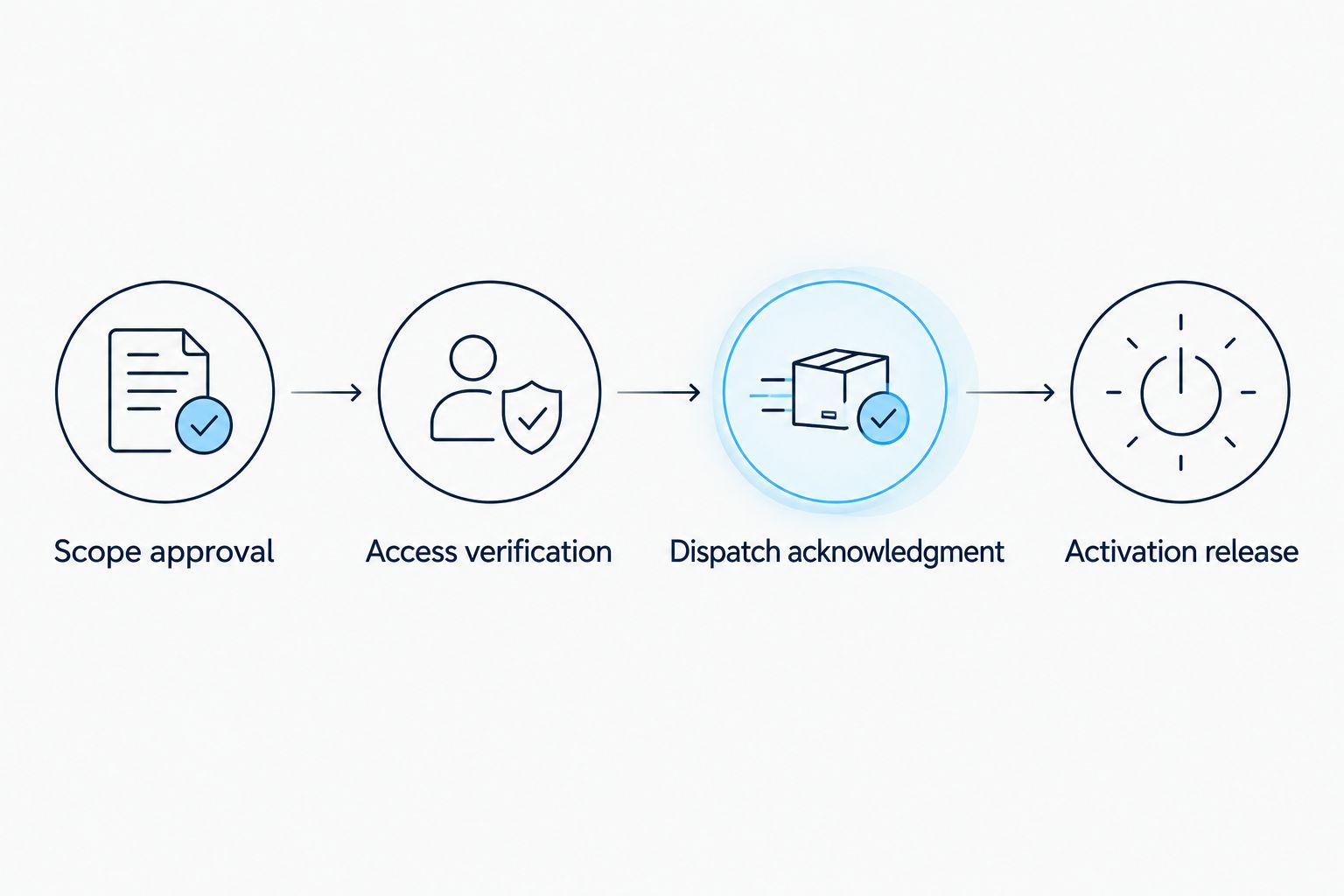
Build the 2026 readiness check around evidence, not a percentage-complete field. A record with an unresolved gate code remains unready even if every administrative document is signed.
- Check Scope approval. Confirm that the current plan and service instructions match the approved agreement. Record the approval reference rather than accepting a general statement that the portfolio is covered.
- Check Access verification. Ask the responsible site contact to verify entry instructions, operating restrictions, and the approved means of sharing credentials. Record who verified access and when. Do not ask staff to enter restricted areas without authorization.
- Check Dispatch acknowledgment. Obtain confirmation that the contractor's operational contact has the current site instructions and knows the agreed activation date. Record the acknowledgment reference. Do not infer route assignment from an invoice, signature notification, or calendar reminder.
- Check Activation release. Have the designated release owner review the preceding evidence and record the activation date. Leave any failed property on Hold with an owner and required correction. Preserve the reason for release alongside the approved version.
Expected result: Active means the scope is approved, access is verified, the operational handoff is acknowledged, and release is authorized—not merely that someone changed a status.
Keep release authority separate from routine data entry where your team structure allows it. The person correcting a mailing address should not accidentally activate a site by editing an unrelated field.
Dispatch handoff and validation
Activation establishes readiness for the agreed service. It is not a weather event, an automatic dispatch instruction, or a guarantee of a particular arrival time.
- Assemble the handoff packet. Include the site identifier, approved plan, service rules, access reference, contacts, exclusions, and activation date. Keep billing instructions available to the administrative team without cluttering the crew-facing instructions.
- Define completion evidence. Agree on the service record fields your team needs, including property identity, service date, arrival and departure records, work performed, exceptions, and supporting photos where agreed. St. Louis Snow Removal provides documented commercial snow removal; confirm the specific evidence and delivery method for your agreement.
- Run validation cases. Test 3 cases before relying on the workflow: a fully approved property, a property with missing access confirmation, and a property with conflicting scope versions. Use clearly marked test records or a walkthrough. Do not generate a live service request just to test onboarding.
- Verify the downstream handoff. Check that the ready case can be released and that the blocked cases stay on Hold. Confirm that the site identifier carries into the service-record process. Use the guide to connect snow removal proof-of-service logs to your PM software when designing that next handoff.
Expected result: The workflow distinguishes ready from incomplete properties, and subsequent service evidence can be matched to the approved site record.
Keep the test results with the 2026 setup documents. Record the issue, correction, and person accepting the result; a test without a recorded outcome provides no release evidence.
Activate properties together or in phases
Choose the release pattern explicitly. Neither approach changes the readiness requirements for an individual property, and phased release must fit the agreement.
| Release approach | Best for | Advantage | Limitation |
|---|---|---|---|
| Portfolio-wide activation | Portfolios requiring a coordinated start | Establishes a common release point | An unresolved property can delay the combined release |
| Site-by-site activation | Portfolios with independently approved locations | Lets ready properties proceed separately when agreed | Requires precise active-site tracking and separate acknowledgments |
Use site-by-site activation only when the agreement and operational handoff support it. A partial list marked “approved” is too ambiguous. Identify each active property by site identifier and retain the corresponding release evidence.
Revalidate whenever a property changes
An added loading area, changed entrance, new tenant schedule, or revised access process creates a second workflow: change control for an already active site.
- Record the requested change and affected service areas.
- Preserve the previous approved version and create a revised plan or instruction record.
- Obtain approval and contractor acknowledgment for the affected scope.
- Set the effective date and identify which instructions apply until then.
- Confirm the operational handoff before treating the revision as active.
Do not automatically suspend an entire portfolio because one property's instructions change. Document the affected site and service component, then agree on any temporary operating arrangement.
Troubleshooting
A signed property still lacks operational confirmation
Keep the property in Readiness review or Hold. Ask the designated contractor contact to confirm receipt of the current operating packet and activation date; store that response before release.
The same property appears under different names
Match the records by address and approved service boundaries, then consolidate them under the correct site identifier. Preserve historical references so invoices and service records remain traceable. Review the release history before retiring a duplicate.
The contract and site map show different work areas
Stop release of the disputed scope. Have the authorized parties resolve the difference through the agreement's change process, update the operating packet, and obtain acknowledgment of the corrected version.
An active property's access instructions change
Notify the operational contact through the agreed channel and record acknowledgment. Replace the crew-facing reference without exposing credentials in a broad notification. Identify any temporary restriction explicitly.
A status change sends a notice but proves nothing
Separate notification from acknowledgment. A sent email proves transmission, not acceptance of scope or readiness; require a recorded confirmation before the release owner activates the property.
Customize your workflow
Once activation works, extend the same site identifier into service logs, invoice review, and exception follow-up. Keep administrative events separate from operational events: a signed agreement, an activated property, a dispatched visit, and a completed visit are different records.
For St. Louis Snow Removal commercial snow removal, use onboarding to agree on the documentation handoff as well as the physical work. The benefit is a traceable connection between approved instructions and reported service; the limitation is that documentation cannot correct an omitted area or resolve contradictory contract language by itself.
For your 2026 process, assign an owner to every exception. A completion record noting blocked access should create a follow-up task, not disappear into an archive.
FAQ
What is multi site snow contract onboarding?
Multi site snow contract onboarding is the process of turning a portfolio agreement into approved, operationally ready property records. Each location needs its own scope, access instructions, approvals, and activation evidence.
Does signing a snow contract activate every property?
Do not treat signature alone as operational activation. Confirm each property's effective date, approved scope, access readiness, and contractor acknowledgment under the agreed process.
Can I activate some properties before the whole portfolio is ready?
Yes, when the agreement and contractor's operational process permit phased activation. Identify the released properties individually and keep incomplete locations clearly on Hold.
What information does each property need before activation?
Each property needs a unique identifier, service address, approved site plan, service rules, access instructions, responsible contacts, and release evidence. Include billing information and documentation requirements in the appropriate administrative records.
Do I need special software for snow contract onboarding?
No particular software is required for this workflow. A controlled register, document repository, and recorded approval process can support it; automated connections require their own permissions and testing.
What happens when a site's snow removal scope changes?
Reapprove the affected scope before treating the revision as active. Preserve the earlier version, record the effective date, and obtain acknowledgment that the operational contact has the revised instructions.
Does documented snow service eliminate slip-and-fall liability?
No, service documentation does not eliminate liability. It records reported activity and conditions; legal obligations and the significance of that evidence depend on the applicable facts and law.
One last thing
Test a property that should fail onboarding. A workflow that releases a complete record but also releases a site with missing access confirmation has not passed. The hold decision is as important as the activation decision.