

Instead of manually checking the salt pile and chasing delivery updates, set a salt inventory reorder trigger that compares usable material with expected consumption before the next confirmed delivery. This 2026 workflow connects stock movements, storm demand, purchasing approval, and receipt verification so a low-stock warning becomes an assigned action—not an unanswered message.
- Set your salt inventory reorder trigger from lead-time demand plus a documented safety reserve.
- Exclude unusable material and track incoming deliveries separately from physical salt inventory.
- St. Louis Snow Removal provides documented commercial de-icing/salting; this guide describes a workflow you configure yourself.
- Recalculate mid-season reorder thresholds when route demand, supplier lead time, or usable stock changes.
Why this matters
A purchase order does not put salt in a spreader. Your reorder decision needs to distinguish material physically ready for loading from material requested, approved, ordered, or awaiting delivery.
St. Louis Snow Removal is best for property managers seeking documented commercial snow and ice removal. Apply that same documentation standard to your material ledger: each withdrawal needs a quantity, a location, and a service reference. Use the commercial snow removal service log guide to connect inventory withdrawals with field records.
For your 2026 setup, keep two decisions separate: whether purchasing must act and whether dispatch has enough usable material for assigned work. One warning cannot reliably answer both questions.
Before you start
- Access: Use a shared spreadsheet or inventory system that your stock recorder, dispatch lead, and purchasing approver can update. Identify who can edit quantities and who can approve an order.
- Materials: Gather a physical opening count, delivery tickets, withdrawal records, current route requirements, storage constraints, and supplier-confirmed lead times. Create a separate record for each material and storage location.
- Gotcha: Standardize units before calculating balances. A US short ton equals 2,000 pounds; a metric tonne equals 1,000 kilograms; 1 pound equals 16 ounces. Do not treat differently labeled tons, bags, or loader scoops as interchangeable quantities.
The bold field names below are labels you create in your own worksheet or system, not claims about an existing software interface. Use the same labels across the stock ledger, approval record, and receiving checklist.
Stock ledger configuration
Establish a usable opening balance
- Create a material-location record. Add Material, Storage location, Base unit, Count timestamp, and Count owner. Keep bulk salt separate from bagged materials and blends with different handling or application requirements.
- Count physical material using your documented measurement method. Record Physical stock and identify any amount that cannot presently be loaded or used as intended.
- Add Unusable stock and Usable on hand. Calculate usable on hand as physical stock minus unusable stock. Record why material was excluded rather than silently reducing the balance.
- Create a movement ledger with Movement ID, Timestamp, Material, Location, Movement type, Quantity, Reference, and Recorded by. Use receipts, withdrawals, returns, transfers, and adjustments as distinct movement types.
- Require a supporting reference for every adjustment. A recount, damaged-material note, or corrected delivery ticket explains a change; an unexplained overwrite does not.
Expected result: You can trace the usable balance back to an opening count and subsequent movements without reconstructing it from text messages.
Record withdrawals without double-counting
Record a withdrawal when salt leaves the tracked storage location. Connect the withdrawal to the truck, route, or service record, but do not subtract the same material again when the application log arrives.
If you track truck inventory separately, treat loading as a transfer between locations. Record application as consumption from the truck location. If you track only yard inventory, loading is the yard withdrawal; the service log supports allocation rather than another deduction.
Return unused material through a documented return movement. Keep returned material excluded from usable stock until its condition and quantity are verified.
Reorder threshold configuration
Calculate demand during supplier lead time
- Add Supplier lead time and Lead-time source. Record the interval from order release to usable receipt, including your receiving constraints. Keep a supplier statement distinct from a delivery commitment for a specific order.
- Add Lead-time demand. Estimate material required for the work expected before replenishment can be received, using your route plans, service history, and current storm assessment. Match the demand period to the lead-time period.
- Add Safety reserve. Document the operational reason for the reserve, such as uncertainty in repeat treatments or replenishment timing. Do not copy an unexplained percentage from another operator.
- Calculate Reorder threshold = Lead-time demand + Safety reserve. Store the calculation inputs alongside the result so purchasing can see why the threshold changed.
- Add Inventory position. Calculate it as usable on hand plus confirmed incoming material minus demand already committed and not otherwise included in your demand calculation.
Expected result: Your threshold has an operational explanation, and your inventory position does not count the same commitment twice.
Keep the demand calculation consistent
Choose one demand convention and document it. Either include assigned work within lead-time demand or subtract that assigned work from inventory position. Do not do both.
Incoming material also needs a timing check. Include a confirmed receipt in the purchasing calculation only when it is due within the relevant planning window. An order arriving after the work is scheduled does not cover that work.
Maintain a separate dispatch check:
Dispatch coverage = Usable on hand − Material committed before the next usable receipt.
A low dispatch-coverage balance requires an operational decision even when a purchase order already exists. Escalate the gap instead of treating ordered material as physically present.
Choose the trigger that matches the decision
These are configuration options, not separate products. Use the purchasing and dispatch checks together; reserve a fixed floor for a clearly defined backstop.
| Trigger option | Best for | Advantage | Limitation |
|---|---|---|---|
| Fixed stock floor | A simple backstop for one material-location record | Easy to inspect and explain | Does not change with demand or delivery timing |
| Lead-time demand plus reserve | Routine replenishment decisions | Connects the reorder point to expected consumption | Requires current demand and supplier information |
| Dispatch coverage check | Work scheduled before replenishment arrives | Exposes near-term material gaps | Does not replace the purchasing calculation |
For 2026 mid-season control, use lead-time demand plus reserve as the purchasing trigger and dispatch coverage as the operational exception check. Keep any fixed floor visible, but do not let it substitute for current planning.
Alert and purchasing configuration
Turn a threshold breach into assigned work
- Create Reorder status, Action owner, Approval owner, Order reference, Confirmed receipt date, and Next action. Keep the purchasing state separate from the inventory quantity.
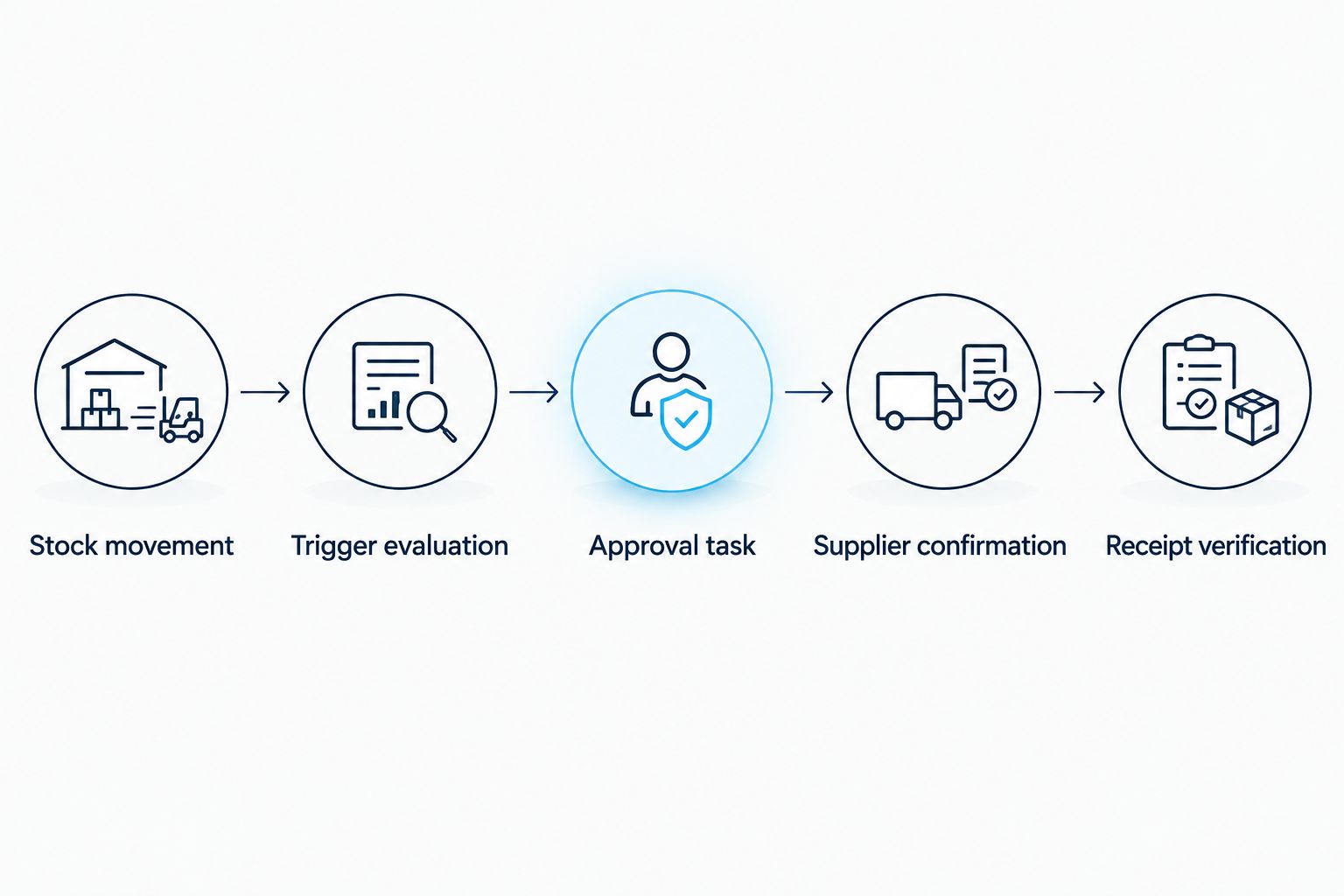
- Configure a rule that evaluates the material-location record after a stock movement or planning update. When inventory position reaches or falls below the reorder threshold, create an approval task for the action owner.
- Include the calculation in the task: usable on hand, qualifying incoming material, lead-time demand, safety reserve, and any dispatch gap. Require an acknowledgment through your existing task or approval process.
- Before releasing an order, check open purchases for that material and location. Match the proposed receipt to storage capacity, receiving access, and the work it must support.
- Record the supplier confirmation. If the receipt date changes, recalculate coverage and update the existing task rather than creating an unrelated warning.
Expected result: A breached threshold produces an accountable purchasing record, not repeated alerts with no owner.
Use one open replenishment case per material-location shortage. Keep subsequent changes inside that case unless they require a genuinely separate purchase. This makes duplicate-order checks possible without hiding a worsening shortage.
The process is a sequence: a movement changes the balance, the balance triggers evaluation, and the evaluation produces an owned decision. Receipt verification closes the purchasing loop.
Verify receipt before closing the case
- Match the delivery ticket to Order reference, Material, and Storage location. Record the received quantity in the base unit.
- Check the quantity and condition using your receiving procedure. Separate any disputed or unusable portion rather than adding the entire ticket quantity to usable stock.
- Post the accepted receipt to the movement ledger. Reduce the outstanding incoming quantity by the amount received so the delivery is not counted twice.
- Recalculate inventory position and dispatch coverage. Close the replenishment case only after recording the remaining action, including any unresolved short shipment.
Expected result: Your ledger shows what was actually received and usable, while any outstanding balance remains visible.
Recalculate whenever storm demand or lead time changes
A second workflow handles changing conditions without waiting for another withdrawal. In 2026, configure recalculation when your route plan, treatment plan, supplier confirmation, or physical count changes.
- Record the changed input and its source. A revised route assignment and a revised delivery date affect different parts of the calculation.
- Rebuild lead-time demand from the updated plan. Keep completed work out of future demand and retain the service record supporting its consumption.
- Recalculate the threshold, inventory position, and dispatch coverage. Compare the new result with any open replenishment case.
- Update the existing owner’s next action. Record whether purchasing needs to amend an order, dispatch needs to review coverage, or the physical count needs verification.
Expected result: A longer replenishment interval or additional planned treatment can trigger action before the pile reaches its previous reorder point.
Keep the original calculation in the record. Mid-season revisions need a timestamp and a reason so you can distinguish a justified planning change from a correction to bad data.
Troubleshooting
The ledger shows enough salt, but loading cannot proceed
Fix: Recount usable material and inspect the exclusions. Wet, obstructed, contaminated, or otherwise unusable stock must not remain in the loading balance. Record the correction as an adjustment with its reason.
Alerts repeat after purchasing has placed an order
Fix: Connect the alert to the existing replenishment case and check the confirmed receipt timing. Suppress duplicate task creation, not the underlying shortage warning. A placed order does not automatically resolve dispatch coverage.
Stock drops twice for the same route
Fix: Check whether yard loading and field application both deducted from the same inventory location. Use a transfer for separately tracked truck stock, or use the application record only to allocate an existing yard withdrawal.
A delivery increases inventory by more than it should
Fix: Check whether incoming stock remained in inventory position after the receipt was posted. Also inspect unit conversion and partial-delivery handling. Preserve the delivery ticket and correction history.
The reorder point stays unchanged despite a revised plan
Fix: Check the recalculation events. Changes to supplier lead time, route commitments, safety reserve, and usable stock must reevaluate the rule. A movement-only trigger misses planning changes that happen before material leaves storage.
Customize your workflow
Expand the workflow by location before combining it into a fleet-wide total. A healthy overall balance can conceal a shortage at the yard serving tomorrow’s route. Record transfer decisions explicitly, including who verifies the receiving balance.
For property managers working with St. Louis Snow Removal, keep the service documentation request separate from assumptions about contractor-owned inventory. The company provides documented commercial de-icing/salting; confirm responsibility for material tracking in your service arrangement rather than assuming access to an internal purchasing system.
This workflow’s strength is traceability. Its limitation is equally direct: incorrect counts, missing withdrawals, and stale demand inputs produce incorrect reorder decisions. Assign responsibility for those inputs before adding notifications.
For your next 2026 review, inspect one completed replenishment case from threshold breach through verified receipt. Fix any missing handoff before expanding the setup to more locations.
FAQ
What is a salt inventory reorder trigger?
A salt inventory reorder trigger is a rule that starts replenishment action when your inventory position reaches a defined threshold. A demand-based threshold combines expected consumption during supplier lead time with a documented safety reserve.
Should I count salt that is already on order?
Count confirmed incoming salt separately from physical stock and include it in purchasing calculations only when its receipt fits the planning window. Do not count it as usable material for dispatch before it has been received and verified.
What is the best reorder method for commercial de-icing salt?
Use lead-time demand plus a documented reserve for purchasing, alongside a separate dispatch coverage check. This connects replenishment to expected work while exposing shortages that occur before a delivery arrives.
Can I build this salt inventory workflow in a spreadsheet?
Yes, a shared spreadsheet can hold the movement ledger, threshold calculation, and purchasing status. Assign edit permissions and record ownership, and use your existing task process for approvals if the spreadsheet does not support them.
When should I change my mid-season salt reorder point?
Recalculate when planned consumption, supplier lead time, usable stock, or your documented reserve changes. Preserve the previous inputs and record the reason for the revision.
How do I stop duplicate salt orders?
Keep one open replenishment case for each material-location shortage and check outstanding purchases before releasing another order. Update that case when demand or delivery timing changes rather than creating disconnected alerts.
Does St. Louis Snow Removal provide inventory software?
This guide describes a workflow you configure in your own spreadsheet or inventory system, not an inventory software offer. St. Louis Snow Removal provides documented commercial snow plowing, de-icing/salting, and sidewalk clearing.
One last thing
Test the trigger without placing an order. Walk a completed withdrawal and receipt through a copy of your ledger, then check whether the rule identifies the correct owner and next action.
The useful result is not a warning that says salt is low. It is a record showing what changed, what work needs coverage, and who must act before replenishment arrives.